Guide to the implementation of AIDA-PVA in SLAC National Accelerator Laboratory.
EPICS Backport 1.5
In order to make AIDA-PVA work on VMS EPICS had to be backported to Java 1.5. This created the following libraries that were used to build the AIDA-PVA SERVICE Jar and run the EPICS framework on VMS.
- EPICS-PVACCESS-bp15.JAR - Backported version of PVACCESS.JAR.
- EPICS-PVDATA-bp15.JAR - Backported version of PVDATA.JAR.
- EPICS_FORWARDER.JAR - New component of EPICS required for the framework on VMS.
- See also
- Porting EPICS to Java 1.5 on VMS for more information
AIDA-PVA SERVICE
The AIDA-PVA Service is a shaded jar that implements the AIDA-PVA framework. It is therefore a self-contained executable JAR that when run becomes the Channel Provider Process.
The AIDA-PVA service uses a plug-and-play architecture for the implementation of the channel provider. It is configured as follows:
- It checks the value of a property (
java.library.path) to determine which path to load the Channel Provider image from. In our SLAC environment this is always /SLCSHR.
- It checks the value of a property (
aida.pva.lib.name) or environment variable (AIDA_PVA_LIB_NAME) to determine which Channel Provider image to load. e.g. AIDASLCDB to load the AIDASLCDB.EXE image.
- It checks the value of a property (
aida.pva.channels.filename) or environment variable (AIDA_PVA_CHANNELS_FILENAME) to determine which Channel Configuration File to load. This can be a full path name. e.g. /SLCYML/AIDASLCDB_CHANNELS.YML
- It reads configuration from the selected channel configuration file.
This determines which channels the Channel Provider will support, and where it will find implementations for the endpoints required to service the supported channels. In this way the same JAR can become any Channel Provider simply by modifying these configuration parameters.
The source code is found in the github repository slaclab/aida-pva
Class Hierarchy

Source Code Explanation
- aida-pva
- edu.stanford.slac
- aida
- impl
- lib
- AidaProviderRunner
- AidaRPCServer
- AidaRPCService
- implements request() which is called whenever the service is called by EPICS.
- ChannelProvider
- On creation
- Provides requestScalar(), requestScalarArray(), setValue(), setValueWithScalar() and requestTable() methods to handle all requests and pass them on to the correct NativeChannelProvider endpoint for forwarding to the Native Channel Provider via JNI.
- ChannelProviderFactory
- One static method called create()
- Determines where to load the channel configuration from
- Loads channel configuration from the channel configuration file
- model - classes representing various platform objects: AidaArgument, AidaArguments, AidaChannel, AidaChannelOperationConfig, AidaConfigGroup, AidaField, AidaProvider, AidaTable, AidaType, DoubleArgument, FloatArgument
- util - various utilities
- AidaPva
- Prints AIDA-PVA banner on console
- AidaPVHelper
- asScalar() - Convert given scalar object to PVStructure conforming to PVScalar
- asScalarArray() - Convert given List of scalar objects to PVStructure conforming to PVScalarArray
- asNtTable() - Convert List of Lists to PVStructure conforming to NTTable
- conversion functions from PVField, PVArray, and PVStructure to String, List of Strings, and Json String respectively, extracting out any Floats and Doubles to be sent in ieee format.
- AidaStringUtils
- boring string manipulation functions
- except - exception classes: AidaInternalException, MissingRequiredArgumentException, ServerInitialisationException, UnableToGetDataException, UnableToSetDataException, UnsupportedChannelException, UnsupportedChannelTypeException
- slac.aida
- NativeChannelProvider
- The native endpoints that link to the JNI entry-points in the Channel Provider C code, implemented in AIDA-PVA Module in
AIDA_PVALIB.
AIDA-PVA Linking

- The AIDA-PVA Service loads the Channel Provider shared image, but it does not call any functions in the image that it loads.
- The AIDA-PVA Service calls JNI Entry points implemented in the AIDA-PVA Module in
AIDA_PVALIB
- It has access to them because the Channel Provider is linked with the AIDA-PVA Module to resolve those JNI references.
- AIDA-PVA Module calls the Channel Provider entry-points when it is called by the AIDA-PVA Service.
- Whenever the Channel Provider needs help it calls the Helper functions in AIDA-PVA Module
- Note
- When linking the Channel Provider to the AIDA-PVA Module you need to explicitly request the Modules with the JNI Entry points because even though the Channel Provider code doesn't reference them, the AIDA-PVA Service will need to have them available when it loads the Channel Provider image. This is done with the SYMBOL_VECTOR in the corresponding transfer file.
e.g. (excerpt from AIDASLCDB_XFR_ALPHA.OPT file)
case_sensitive=YES
SYMBOL_VECTOR=(Java_slac_aida_NativeCh1dgccee$=PROCEDURE,-
Java_slac_aida_NativeCh25dfjd6$=PROCEDURE,-
Java_slac_aida_NativeCh3nsgvff$=PROCEDURE,-
Java_slac_aida_NativeCh33ufh3u$=PROCEDURE,-
Java_slac_aida_NativeCh1d5rrm5$=PROCEDURE,-
Java_slac_aida_NativeCh14pujn9$=PROCEDURE,-
Java_slac_aida_NativeCh20mk2i9$=PROCEDURE,-
Java_slac_aida_NativeCh23sgj69$=PROCEDURE,-
Java_slac_aida_NativeCh31p234f$=PROCEDURE,-
Java_slac_aida_NativeCh2a0ae9n$=PROCEDURE,-
Java_slac_aida_NativeCh39m8dhq$=PROCEDURE,-
Java_slac_aida_NativeCh0oj95nt$=PROCEDURE,-
Java_slac_aida_NativeCh2aokrpj$=PROCEDURE,-
Java_slac_aida_NativeCh0nh9dsf$=PROCEDURE,-
Java_slac_aida_NativeCh3tmi2oe$=PROCEDURE,-
Java_slac_aida_NativeCh1s5d4nl$=PROCEDURE,-
Java_slac_aida_NativeCh31oju0v$=PROCEDURE,-
Java_slac_aida_NativeCh2vedmsq$=PROCEDURE,-
Java_slac_aida_NativeCh25vb1ur$=PROCEDURE,-
Java_slac_aida_NativeCh2sdrgol$=PROCEDURE)
case_sensitive=NO
AIDA-PVA Service Execution Flow

- Process is started by calling main() in AidaService. This starts the three motors of AIDA-PVA Service. AidaRPCServer, AidaService, and ChannelProvider.
- The AidaRPCServer will listen for requests on the EPICs network
- The AidaService will be called to handle requests for any supported channel
- The ChannelProvider will:
- Check that the request is valid and what return type is expected
- Get the arguments and put them in the format that AIDA-PVA Module is expecting
- Determine if the request is a Getter or Setter request.
- Forward the request to the appropriate AIDA-PVA Module endpoint.
- Intercept Exceptions thrown by the AIDA-PVA Module and forward them to the EPICs network
- Convert any return values to Normative Types and return data back to EPICs network via AidaService
- AIDA-PVA Module endpoints are called and will return results from the Channel Providers
AIDA-PVA Module
The AIDA-PVA module is a set of C files compiled into Modules and inserted into AIDA_PVALIB, as well as a set of header files that are used to reference the functions declared in the Modules and to define types that they use.
Module header files are used internally by the AIDA-PVA Module.
- C Files
- Module Header Files
- AIDA-PVA Module header files
The files are all committed to CMS and in AIDA_PVALIB. The headers are all committed into C_INC.
For an explanation of the functions provided by AIDA-PVA Module see AIDA-PVA Module Documentation
AIDA-PVA Module Execution Flow
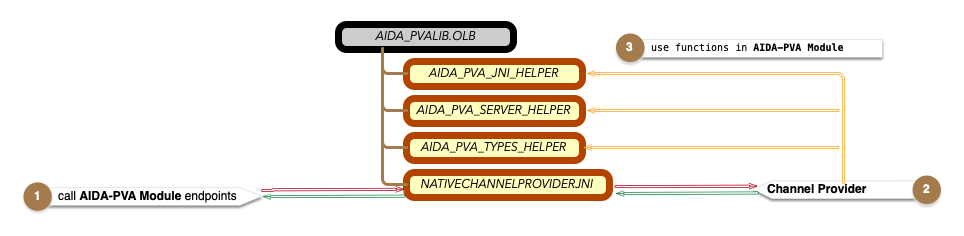
- Following on from AIDA-PVA SERVICE step 5 the AIDA-PVA Module endpoint is called.
- The arguments are unpacked from JNI into sensible structures and validated
- Floating point numbers passed in ieee format are unpacked
- The corresponding Channel Provider endpoint is called
- The results are converted to JNI types for return
- Memory is freed up
- Exceptions are trapped and converted to JNI Exceptions
- Results are returned to AIDA-PVA SERVICE
- The corresponding Channel Provider endpoint is called
- The Channel Provider calls the appropriate Legacy AIDA implementation to return appropriate results.
- The Channel Provider may call back into AIDA-PVA Module to use the many Helper Functions.
AIDA-PVA Channel Provider
Native Providers are coded to implement the AIDA-PVA API defined in aida_pva_api.h.
For an explanation of how the Channel Providers are coded see [The Channel Provider Programmers Reference](2_0_Channel_Provider_Programmers_Reference)
Channel Provider Execution Flow

Internally each Channel Provider is coded differently, but they typically have the following form:
- Validating and get arguments they need using ascanf() and avscanf() from AIDA-PVA Module.
- Call the appropriate legacy AIDA Module in
AIDASHR to access the Device or Database that they support.
- They may also call back in to AIDA-PVA Module to use some of the Helper Functions
Legacy AIDA Modules
AIDA Modules are legacy modules that were created for AIDA. They are used in AIDA-PVA as the low level modules that access the SLAC Network devices. They are implemented as Modules in AIDASHR and are linked with the AIDA-PVA Channel Provider in the build process.

Legacy AIDA Modules
General Documentation for these AIDA Modules can be found here
- Note
- One module has been updated to support AIDA-PVA. The SLC Buffered Data Module was updated to add an entry point DPSLCBUFF_SETMODE() which is called from the AIDA_SLCBPMBUFF Channel Provider.
Specific Code for each legacy module:
Deployment

AIDA-PVA Deployment
For a full description of how to deploy AIDA-PVA in SLAC see A DevOps Guide to AIDA-PVA
Building AIDA-PVA SERVICE
see Building AIDA-PVA SERVICE
Building AIDA-PVA Module
see Building AIDA-PVA Channel Providers
Test Framework
see Test Framework Documentation for more information on testing framework
Useful Stuff
Documentation production
Most of the documentation is a set of Markdown files. They are rooted at /docs in the source tree.
Huge swathes of documentation are generated using Doxygen a source code documentation generator.
For this reason you will see documentation in source code comments that follows the Doxygen format. Even documentation in the Markdown files follows this format.
The configuration file for Doxygen doxygenConfig is in the /docs directory also. A images are stored in /docs/images, included there are also Photoshop files and Omnigraffle image source files so that modifications can be made.
To enhance the look of the documentation doxygen-awesome css was included. This is added as a git submodule under /docs. You won't have to do this again:
git submodule add https://github.com/jothepro/doxygen-awesome-css.git
To get the documentation to read like a book with sections ordered sequentially, the Markdown files are numbered with their section numbers.
Generating Documentation
In order to generate documentation you'll need to get Doxygen.
Also, as the source is spread out over Java and C and in multiple repositories a some pre-processing steps are required.
- De-Lombok the Java Source Code The source relies heavily on the Lombok to simplify POJO generation and other tasks in Java.But this hides many methods and properties from the doxygen documentation processor. To unpack all the Lombok annotations into plain old Java we need to run a De-Lombok process.
- Source needs to be merged into one tree so that doxygen can make references to any code in any of the repositories. This is handled by the script included below.
java -jar ~/.m2/repository/org/projectlombok/lombok/1.18.20/lombok-1.18.20.jar delombok <source-dir> -d <target-dir>
A script to generate the entire documentation including that for the Test Suite is shown below. The script requires that the source for the test is checked out.
# To Generate documentation for AIDA-PVA
## Go to source root
cd $DEV_HOME/aida-pva
## Clean directory where we'll process the combined source files
rm -rf root
# De-lombok test source into /root/test
java -jar ~/.m2/repository/org/projectlombok/lombok/1.18.20/lombok-1.18.20.jar delombok $DEV_HOME/aida-pva-tests/src/main/java -d root/test/java
# De-lombok main source into /root
java -jar ~/.m2/repository/org/projectlombok/lombok/1.18.20/lombok-1.18.20.jar delombok src -d root
## Generate documentation using doxygen using the doxygen configuration file into /docGen/html
doxygen docs/doxygenConfig
## Upload the documentation to the SLAC documentation website
rsync -avz docGen/html/* sly@rhel6-64a.slac.stanford.edu:/afs/slac/www/grp/cd/soft/aida/aida-pva
Generating and Deploying Documentation automatically
GitHub Actions have been created that will automatically regenerate the documentation each time any change is made. This allows Markdown files to be edited directly in github and this documentation to be updated automatically. It also means that any source file comment that is changed will automatically be updated in the documentation.
At the time of writing the last step - pushing generated documentation to the web service in SLAC - is failing due to a permissions' problem - Greg needs to fix this :)
The workflows are defined here for aida-pva and here for aida-pva-tests.
SSH setup
ssh config file
StrictHostKeyChecking no
HashKnownHosts no
Host github.com
AddKeysToAgent yes
UseKeychain yes
IdentityFile ~/.ssh/github_rsa
Host *.slac.stanford.edu
User sly
GSSAPIAuthentication yes
GSSAPIDelegateCredentials yes
Host mccdev.slac.stanford.edu mcc.slac.stanford.edu mcca2.slac.stanford.edu
User <your_user_name>
HostkeyAlgorithms +ssh-dss
PasswordAuthentication no
GSSAPIAuthentication yes
GSSAPIDelegateCredentials yes
You need to have an identify file for github (you'll probably already have one). If not, try this.
This also sets up access without password to any slac unix machine by ssh. The access to VMS should work when you're connected via VPN, although I found the VPN unsatisfactory because it forces all traffic through the SLAC network.
Kerberos
First time out just type the following to store your password in your keychain so that it is used automatically from then on.
kinit --keychain --renewable --forwardable <YOUR_USERNAME>@SLAC.STANFORD.EDU
Proxy Configuration
// This file configures the hosts that must be accessed via the proxy
function FindProxyForURL(url, host)
{
proxy_yes = "SOCKS5 127.0.0.1:1080; SOCKS 127.0.0.1:1080";
proxy_no = "DIRECT";
if (shExpMatch(url, "http*://www*.slac.stanford.edu*") ||
shExpMatch(url, "http*://physics-elog.slac.stanford.edu*") ||
shExpMatch(url, "http*://ad-ops.slac.stanford.edu*") ||
shExpMatch(url, "http*://aosd.slac.stanford.edu*") ||
shExpMatch(url, "http*://intranet.slac.stanford.edu*") ||
shExpMatch(url, "http*://lcls-archapp.slac.stanford.edu*") ||
shExpMatch(url, "http*://slacspace.slac.stanford.edu*") ||
shExpMatch(url, "http*://mccas0.slac.stanford.edu*") ||
shExpMatch(url, "http*://mccelog.slac.stanford.edu*") ||
shExpMatch(url, "http*://oraweb.slac.stanford.edu*") ||
shExpMatch(url, "http*://erp-fsprd.erp.slac.stanford.edu*") ||
shExpMatch(url, "http*://lcls-dev3.slac.stanford.edu*") ||
shExpMatch(url, "http://www-mcc.slac.stanford.edu*") ||
shExpMatch(url, "http*://webmcc.slac.stanford.edu*") ||
shExpMatch(url, "http*://portal.slac.stanford.edu*") ||
shExpMatch(url, "https://www.apple.com") ||
shExpMatch(url, "https://www-public.slac.stanford.edu*")) {
return proxy_yes;
}
else {
return proxy_no;
}
}
Then in your Network Configuration/Advanced/Proxies/Automatic Proxy Configuration set URL = http://localhost/proxy.pac
You have to enable a web server on your local machine running on port 80 that serves the proxy configuration file.
Script for Kerberos and proxy configuration
# Get a kerberos ticket if we don't already have one
kinit sly@SLAC.STANFORD.EDU
# Ket a token
aklog
#
# establish a proxy to stanford so that we can access protected pages as per proxy.pac configuration file
# Note: it always uses a specific host rhel6-64a, if you use rhel6 it will choose a random host and the token won't work half the time.
#
ps -e | sed 's/^.........................//' | grep -e '^ssh -N -D 1080' > /dev/null || ssh -N -D 1080 -g <your_username>@rhel6-64a.slac.stanford.edu &
Git Configuration
cat ~/.gitconfig
[user]
name = <git_username>
email = <git-email>
[filter "media"]
clean = git-media-clean %f
smudge = git-media-smudge %f
[push]
default = matching
[credential]
helper = osxkeychain
[diff "zip"]
textconv = unzip -c -a
[filter "lfs"]
clean = git-lfs clean -- %f
smudge = git-lfs smudge -- %f
process = git-lfs filter-process
required = true
[core]
autocrlf = input
[merge "ours"]
driver = false
[merge "theirs"]
driver = false
JDK Versions on Linux
Two utilities to list and also set jdk version on Linux. Add to your .bashrc on RHEL.
function jdk-versions() {
ls -d /afs/slac/g/lcls/package/java/jdk* | sed 's/[^0-9._]*//g'
}
function jdk() {
local new_version=$1
if [[ "$1" == "" ]]
then
java -version
else
vstring=$(ls -ld /afs/slac/g/lcls/package/java/*${new_version} | sed 's/.*jdk//')
export PATH="/afs/slac/g/lcls/package/java/jdk${vstring}/bin:$(echo ${PATH} | sed -e 's/[^:]*jdk[^:]*://g')"
export JAVA_VERSION=${new_version}
fi
}
To set environment for running EPICS
source /afs/slac/g/lcls/epics/setup/epicsenv-7.0.2-1.1.bash
export EPICS_PVA_ADDR_LIST=mccdev.slac.stanford.edu
References
- See also
-