Introduction: SRS Pipeline
|
On this page: Links: |
The SRS Pipeline developed by the Science Research Software (SRS) group is a software mechanism for organizing and executing massively parallel computing projects. Internally, it consists of a server application, web applications, Unix commands, and Oracle tables. Externally, it offers a general framework within which to organize and execute data processing tasks and processes.
The SRS pipeline was ported from the pipeline developed for the Fermi Gamma Ray Space Telescope, with all Fermi specific functionality removed.
- Automated submission and monitoring of batch jobs.
- Ability to define graph of jobs to be run.
- Ability to parallelize processing tasks.
- Ability to perform simple computations as part of job graph, e.g., compute how many parallel streams to create as a function of the number of events to be processed.
- Ability to "roll back" jobs (whether successful or not)
- Capability to automatically compute sub-graph of jobs to rerun.
- Maintain a full history of all data processing.
- Data catalog to keep track of all data products.
- Web interface for monitoring jobs and submitting new tasks.
- Plus command line client, and programmatic API (application program interface), i.e., a set of building blocks (routines, protocols, and tools for building software applications) that a programmer can easily put together to build a program.
Pipeline and Data Catalog Components
 |
Pipeline Task Specification
| Tasks and subtasks are shown below in boxes; processes are shown in ellipses. XML documents (i.e, either scripts or job configuration files) are used as inputs to the pipeline. A process can be either a batch job or a script. |
|

Example: Fermi's L1 Digitization and Reconstruction Processes and Dependencies
Fermi's Level 1 Digitization and Reconstruction tasks are depicted below; the dots represent processes and their dependencies. Note that merges of processes are also clearly depicted. This structure facilitates identification of success or failure in the completion of successive processes. The Fermi process monitoring tools include links that enable users to quickly "drill down" and identify causes of process failures. An option to "rollback" and rerun a task, subtask, or process is also available, whether or not there was a failure. When rolled back, all successive processes are also rerun. |

Pipeline Implementation
As shown below, the pipeline has a three-tiered architecture consisting of: Backend Components, Middleware, and the Frontend User Interfaces.
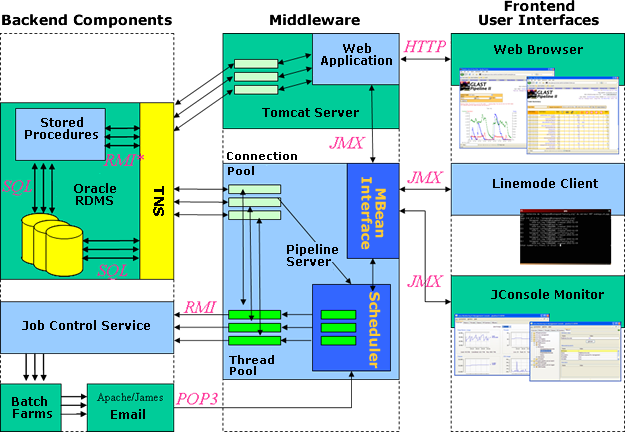 |
| Portability. Other than the tight coupling to Oracle Database, the Data Processing Pipeline uses only open source third party components. The system may be easily extended to other batch processing systems by implementing a simple Java Interface. Condor is an obvious (free and lightweight) candidate, as are the “Grid tools". |
Backend Components
Oracle Database. The Oracle database consists of a pair of Sun Niagara-class, 64-thread servers in a primary/secondary redundant configuration. All processing states, past and present, are stored in database tables. The highly-configurable Oracle scheduler is used to run periodic jobs that tabulate various measures of system throughput, including resource usage of the Oracle Server itself. These quantities are then made available to users via trending plots in the web front-end. Stored procedures in Oracle’s proprietary language (PL/SQL) and in Java are used to perform query-intensive tasks; for example, the rules-engine (which evaluates dependencies upon process completion and determines which among the dependent processes should be executed or skipped) is run entirely within the database.
Job Control Service and Batch Farms. Currently, Fermi pipeline processing is performed on two farms: SLAC's Platform-LSF cluster and the BQS cluster at Lyon, France. Each cluster-specific tool set is wrapped to provide a uniform interface (SubmitJob, GetJobStatus, KillJob, etc.). Applications known as a Job Control Services publish the uniform interface though Remote Method Invocation (RMI4) and handle requests from the Pipeline Server.
Email Messaging. Email provides asynchronous, persistent messaging from batch jobs to the pipeline server. An email is sent at the beginning of each batch job to inform the pipeline server that the job has started, which node accepted the job, and any other pertinent information.
Another email is sent when the job finishes to transmit the return-code, resource-usage, elapsed wall-clock time, variables the process wants to pass to it’s dependents, and any system commands the process wants executed by the server; for example: create four streams of the “Reconstruction” subtask.
Because the system sends tens of thousands of email messages per day, we maintain a dedicated email server running the free Apache JAMES software.
Middleware
Pipeline Server. The pipeline server maintains two pools of Java threads: a work pool, and an admin pool.
The work pool manages the processes. When a batch process becomes available to run on one of the farms, a thread is allocated to perform the submission using the appropriate Job Control Service. Email status reports from the batch jobs are also handled by these threads, making updates to the database tables that record the processing state.
Users may also define Jython ‘scriptlets’ to be run in these threads. These scriptlets are provided APIs to both the Pipeline Server and to the Data Catalog. The Pipeline Server API allows querying of other processes, creation of substreams, getting/ setting variables, etc. The Data Catalog API allows registration of output datasets and querying for input datasets.
The admin pool runs runs tasks which find work and delegate it to the worker pool. These include gathering status messages from the mail server and querying the database for processes that are ready to run.
A subset of the pipeline API is also made available via Java Management Extensions (JMX), providing a call interface to the various user interface applications.
Web Applications. A cluster of Apache Tomcat servers host pages written in JSP. These pages provide a graphical user interface across platforms and are available worldwide. Using SQL queries, the applications read data for display directly from the Oracle database. Java Tag Libraries are used to make JMX requests when interaction with the Pipeline Server is required. Tag libraries also provide more complex functionality such as plotting. (See AIDA Tag Library.)
Frontend User Interfaces
User interfaces are provided through the Internet using the web applications discussed above, as well as through command line interfaces. In each case JMX is used to communicate user requests to the pipeline server. CAS user authentication, linked to the laboratory’s user database and coupled with a tiered user privilege model, allows fine-grained control over the operations an individual user is allowed to perform.
Software Component Architecture
The primary software components of the pipeline include:
- Task (and subtask) - A top level definition of work to be performed by the pipeline. A task may consist of one or more processes, and zero or more nested subtasks. Tasks are defined by an XML file.
- Stream (and substream) - A stream represents a single request to run the processes within a task. Streams always have an associated stream number which must be unique within each task. The stream number is always set at create stream time, either explicitly by the user or implied.
- Process - A single step within a task or subtask. Each process must be either a script or a job.
- Script - A process which results in a script being run inside the pipeline server. These small scripts are typically used to perform simple calculations, set variables, create subtasks, or make entries in the data catalog. Scripts can call functions provided by the pipeline, as well as additional functions for adding entries to the data catalog.
- Job - A process which results in a batch job being run.
- Variables - Pipeline variables can be defined in a pipeline XML file, either at the task level, or at the level of individual processes. They can also be defined at create stream time. Processes inherit variables from:
- The task which contains them.
- Any parent task of the task which contains them.
- Any variables defined at "create stream" time.
- Variables defined at create stream time.
Task Services
Task services offered by the pipeline include:
- DataCatalog
- Rules-based scheduler
- User variables for intraTask communication
- Express Python scripting (e.g., dynamic stream creation, and DB activities)
- Interface to batch system
- Signal handling
- Support for off-site processing
Operator Services
Operator services offered by the pipeline include:
- Web interface
- Task/Stream management
- Task/Stream Status
- Task/Stream plotted statistics
- Unix command-line interface
- Processing history database
Owned by: Tony Johnson and Tom Glanzman |
|
| Last updated by: Chuck Patterson 03/16/2010 |