|
|
|
|
||||||||

- IRMIS at SLAC
- User Interfaces and querying
- Operational and Support Details
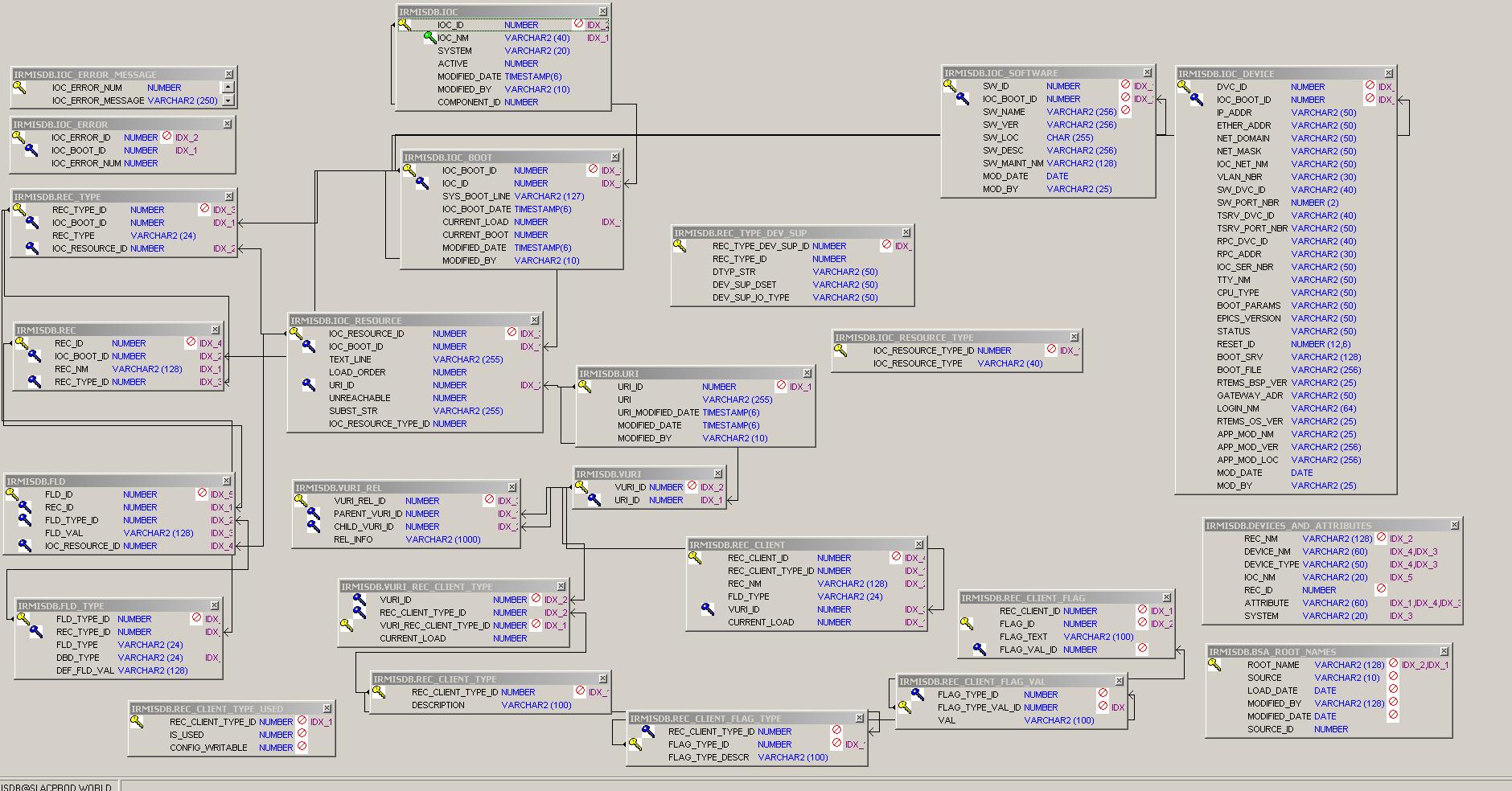
- Schema diagram (basic IRMIS
IOC/PV/PV Client tables)
NEW CONFLUENCE IRMIS WEB PAGE - PLEASE CLICK TO GO THERE INSTEAD FOR THE LATEST INFO
IRMIS Overview
"IRMIS is a collaborative effort between several EPICS sites to build a common Relational DataBase schema and a set of tools to populate and search an RDB that contains information about the operational EPICS IOCs installed at that site." IRMIS (the schema, crawler programs and UI) was developed by Don Dohan and Claude Saunders at APS. For general information and distributions see the IRMIS home page.
IRMIS @ SLAC
IRMIS is used at SLAC for the following purposes, from several different interfaces:
· Data source for PV names for AIDA (nightly cron jobs)
· Data source for element EPICS device names for LCLS_INFRASTRUCTURE (nightly cron jobs)
· PV and PV Client lists and data (IRMIS gui)
· IOC configuration and parameters (IOC Info APEX: https://seal.slac.stanford.edu/apex/mccqa/f?p=104:8)
· IOC and application configuration data (IOC Info jsp app: https://seal.slac.stanford.edu/IRMISQueries )
· EPICS camdmp application (APEX app: https://seal.slac.stanford.edu/apex/mccqa/f?p=103:4)
· Archiver PV search application (APEX app: https://seal.slac.stanford.edu/apex/mccqa/f?p=259:8 )
· Lists of IOCs and their PV populations (web page: http://mccas0.slac.stanford.edu/crawler/ioc_report.html)
· ad hoc queries using TOAD, sqlplus, pl/sql, perl scripts, or other db query tool.
· IRMIS crawler logs, with duplicate PV reports: http://www.slac.stanford.edu/grp/lcls/controls/sysGroup/report
Elements of the IRMIS database that have been
adopted and modified for the controls software group at SLAC:
- The
Oracle PV schema
- PV,
ALH crawlers
- the IRMIS gui
Other elements of the collaboration IRMIS installation include cabling, device and application schemas. We are not populating these now...but may in the future.
Elements modified or created at SLAC:
- IOC boot syntax adaptations in the PV crawler and IOC
Info crawler (adopted from SNS) and schema
- Special application-oriented tables in the IRMIS
schema, and their population scripts (for example for EPICS camdmp and the
archiver PV viewer app)
- Addition of config file tree structure crawling in the
ALH crawler
- New crawlers for Channel Watcher and Channel Archiver
- New PV Client viewer addition to the IRMIS Desktop
- New guis
UI
and DATABASE QUERYING
IRMIS GUI
This is a java UI for the IRMIS Oracle database, developed by Claude Saunders of the EPICS collaboration, can be invoked in 3 ways:
1. from the lclshome edm display:
click the “IRMIS…” button
2. from a Solaris or Linux workstation:
run this script:
irmisUI
The gui paradigm is a set of “document types”; click the File/New Document menu for the list. Right now there are only 2 available for use at SLAC:
1. idt::pv – Search for lists of PVs and IOCs. This is the most useful interface, and it comes up upon application startup.
2. idt::pvClient – Search for PV Client lists (alarm handler, archiver, channel watcher)
Query results can be saved to an ascii file for further processing.
IOC Parameters APEX application
This is an APEX application
showing IOC configuration data, and various operational parameter snapshots
(obtained live nightly using caget).
https://seal.slac.stanford.edu/apex/mccqa/f?p=104:8
IOC Info query application
This is a jsp web application
containing data about IOCs and applications, and their configurations.
https://seal.slac.stanford.edu/IRMISQueries/
EPICS camdmp APEX application
Various reports listing PVs and
their module and channel connections.
https://seal.slac.stanford.edu/apex/mccqa/f?p=103:4
Archiver PV query APEX application
Lists of archived PVs by IOC
application, IOC.
https://seal.slac.stanford.edu/apex/mccqa/f?p=259:8
IOC list report (run nightly)
This html report is created
nightly by the LCLS PV Crawler
http://mccas0.slac.stanford.edu/crawler/ioc_report.html
PV Crawler logs (which include the duplicate PV lists)
http://www.slac.stanford.edu/grp/lcls/controls/sysGroup/report/
a subset here:
http://www.slac.stanford.edu/cgi-bin/lwgate/CONTROLS-SOFTWARE-REPORTS/archives
SQL querying
A view has been created to ease sql querying for PV lists. This view combines data from the IOC_BOOT, IOC, REC and REC_TYPE tables. It selects currently loaded PVs, where IOC_BOOT.CURRENT_LOAD = 1, with the latest IOC boot date captured.
- CURR_PVS view has all currently loaded PVs
OPERATIONAL and SUPPORT
DETAILS
At SLAC, in a nutshell the PV and PV client crawlers
update:
o all IRMIS tables in MCCQA. All
IRMIS UIs query data on MCCQA: PV and IOC data, and PV Client data.
o 3 production tables on MCCO, which are used by other system – AIDA, BSA
applications
Oracle schemas and accounts
The IRMIS database schema is installed in 4 SLAC Oracle instances:
- MCCQA IRMISDB schema: Production for all gui’s and
applications. Contains data
populated nightly by perl crawler scripts from production IOC
configuration files. Data
validation is done following each load.
- MCCO IRMISDB schema: contains
production data, currently for 3
tables only: bsa_root_names, devices_and_attributes, curr_pvs. MCCQA data is copied to MCCO once it has
been validated. So MCCO is as
close as possible to pristine data at all times.
- SLACDEV contains the 3 schemas
which are used for developing, testing and staging new features before
release to production on MCCQA (see accounts
below)
- IRMISDB – sandbox for
all kinds of development, data sifting, etc. Not refreshed from prod, or not very
often.
- IRMISDB_TEST – testing
for application implementation.
Refreshed from prod at the start of a development project.
- IRMISDB_STAGE – staging
for testing completed applications against recently-refreshed production
data.
- SLACPROD IRMISDB schema: this is
obsolete, but will be kept around for awhile (6 months?) as a starting
point in case the DB migration goes awry somehow.
Other Oracle accounts
·
IRMIS_RO –
read-only account (not used much yet – but available)
·
IOC_MGMT –
created for earlier IOC info project with a member of the EPICS group which is
not active at the moment- new ioc info work is being done using IRMISDB
For passwords see Judy Rock or Poonam Pandey or Elie Grunhaus.
As of September 15, all crawler-related shell scripts and perl scripts use the getPwd script (Greg White) to get the latest Oracle password. Oracle passwords must be changed every 6 months; new passwords will be given to Ken Brobeck to update the secure master password files at password change time.
**The IRMIS GUI and the JSP application still use hardcoded passwords. These must be changed “manually” at every password change cycle.
Database structure: see schema diagram below. (this diagram excludes the EPICS camdmp structure, which is documented separately here: <url will be supplied>)
Crawler scripts
The PV crawler is run once for each IOC boot directory structure. The LCLS PV crawler (runLCLSPVCrawlerLx.bash) runs the crawler only once. It is separate to enable it to be run on a different schedule and different host which can see the LCLS IOC directories. Also, the crawler code has been modified to be LCLS-specific; it is a different version than the SLAC PV crawler.
The SLAC PV crawler (runSLACPVCrawler.csh) runs the crawler a couple of times to accommodate the various CD IOC directory structures.
cron jobs
· LCLS side: laci on lcls-daemon2: runLCLSPVcrawlerLx.bash: crawls LCLS PVs and creates lcls-specific tables (bsa_root_names, devices_and_attributes), copies LCLS client config files to dir where CD client crawlers can see them.
· LCLS side: laci on lcls-daemon2: caget4curr_ioc_device.bash: does cagets to populate curr_ioc_devices for the IOC Info APEX app. Run separately from the crawlers because cagets can hang unexpectedly – they are best done in an isolated script!
· CD side: cddev on slcs2: runAllCDCrawlers.csh: runs CD PV crawler and all client crawlers, data validation, and sync to MCCO.
· FACET side: flaci on facet-daemon2: runFACETPVcrawlerLx.bash: crawls FACET PVs, copies FACET client config files to dir where CD client crawlers can see them.
PV crawler operation summary
For the location of the crawler scripts, see Source code directories below.
Basic steps as called by cron scripts are:
1. run FACET pv crawler to populate MCCQA tables
2. run LCLS pv crawlers to populate MCCQA tables
3. run CD pv and pv client crawlers to populate MCCQA tables
4. run Data Validation for PV data in MCCQA
5. if Data Validation returns SUCCESS, run synchonization of MCCQA data to selected (3 only at the moment) MCCO tables.
6. run caget4curr_ioc_device to populate caget columns of curr_ioc_device
** For PV Crawlers: the crawler group for any given IOC is determined by its row in the IOC table. The system column refers to the boot group for the IOC, as shown below.
* The PV client crawlers load all client directories in their config
files; currently includes both CD and LCLS.
LOGFILES, Oracle audit table
Log filenames are created by appending a timestamp to the root name shown in the tables below.
The major steps in the crawler jobs write entries into the Oracle CONTROLS_GLOBAL.DATA_VALIDATION_AUDIT table. Each entry has these attributes:
o
Instance
o
Schema
o
Process
o
Stage
o
Status
o
Message
o
TOD (time of day)
(see
below for details on querying this table)
Descriptions of the MAIN scripts
(there other subsidiary scripts as well):
these are all ultimately invoked from the cron jobs shown above; the cron scripts call the others.
BLUE script names are
on the CD side
GREEN script names are
on the LCLS side
PURPLE script names are
on the FACET side
|
script name |
descr |
||||||||||||
|
runAllCDCrawlers.csh in
/afs/slac/g/cd/soft/tools/irmis/cd_script |
runs · SLAC PV crawler · all client crawlers · rec client cleanup · data validation for all current crawl data (LCLS and CD) · sync to MCCO Logfile: /nfs/slac/g/cd/log/irmis/pv/ CDCrawlerAll.log |
||||||||||||
|
runSLACPVCrawler.csh
in
/afs/slac/g/cd/soft/tools/irmis/cd_script |
run by runAllCDCrawlers.csh: crawls NLCTA IOCs (previously handled PEPII IOCs) The PV crawler is run 4 times
within this script to accommodate the various boot directory structures:
|
||||||||||||
|
runLCLSPVCrawlerLx.bash in /usr/local/lcls/tools/irmis/script/
|
crawls LCLS IOCs
|
||||||||||||
|
runFACETPVCrawlerLx.bash in /usr/local/facet/tools/irmis/script/ |
crawls FACET IOCs
|
||||||||||||
|
runClientCrawlers.csh in
/afs/slac/g/cd/soft/tools/irmis/cd_utils individual client crawler scripts are here in
/afs/slac/g/cd/soft/tools/irmis/cd_script |
Runs PV client crawlers in sequence. LCLS client config files are all scp-ed to /nfs/slac/g/cd/crawler/lcls*Configs for crawling
Also runs load_vuri_rec_client_type.pl for clients that don't handle vuri_rec_client_type records (sequence crawler only, at the moment) |
||||||||||||
|
runRecClientCleanup.csh in in
/afs/slac/g/cd/soft/tools/irmis/cd_script |
deletes
all non-current rec client, rec client flag and vuri rows. Logs to
/nfs/slac/g/cd/log/irmis/client_cleanupLOG.* |
||||||||||||
|
run_find_devices.bash in /usr/local/lcls/tools/irmis/script/ |
for
LCLS and FACET only, populate the devices_and_attributes table, a list of
device names and attributes based on the LCLS PV naming convention. For
PV DEV:AREA:UNIT:ATTRIBUTE, DEV:AREA:UNIT is the device, ATTRIBUTE is the
attribute. |
||||||||||||
|
run_load_bsa_root_names.bash in /usr/local/lcls/tools/irmis/script/ |
loads
bsa_root_names table by running stored procedure LOAD_BSA_ROOT_NAMES. LCLS and FACET names. |
||||||||||||
|
ioc_report.bash in
/usr/local/lcls/tools/irmis/script/ ioc_report-facet.bash in /usr/local/facet/tools/irmis/script/ |
runs
at the end of the LCLS PV crawl, which is last, creates the web ioc report :
http://www.slac.stanford.edu/grp/cd/soft/database/reports/ioc_report.html |
||||||||||||
|
updateMaterializedViews.csh in
/afs/slac/g/cd/soft/tools/irmis/cd_script |
refreshes
materialized view from curr_pvs |
||||||||||||
|
findDupePVs.bash in
/usr/local/lcls/tools/irmis/script/ findDupePVs-all.bash in
/usr/local/facet/tools/irmis/script/ |
finds
duplicate PVs for reporting to e-mail (the
–all version takes system as a parameter) |
||||||||||||
|
copyClientConfigs.bash in
/usr/local/lcls/tools/irmis/script/ copyClientConfigs-facet.bash in
/usr/local/facet/tools/irmis/script/ |
copies
alh, cw and car config files to /nfs for crawling by the client crawler job |
||||||||||||
|
refresh_curr_ioc_device.bash in
/usr/local/lcls/tools/irmis/script/ |
refreshes
the curr_ioc_device table with currently booted info from ioc_device (speeds
up query in the Archiver PV APEX app)
Also see caget4curr_ioc_device.bash below. |
||||||||||||
|
find_LCLSpv_count_changes.bash in
/usr/local/lcls/tools/irmis/script/ find_pv_count_changes-all.bash in
/usr/local/facet/tools/irmis/script/ |
finds
the IOCs with PV counts that changed in the last LCLS crawler run. This is reported in the logfile, and in the
daily e-mail. (the
–all version takes system as a parameter) |
||||||||||||
|
populate_dtyp_io_tab.bash populate_io_curr_pvs_and_fields.bash run_load_hw_dev_pvs.bash run_parse_camac_io.bash in
/usr/local/lcls/tools/irmis/script/ |
set
of script to populate various tables for the EPICS camdmp APEX application. |
||||||||||||
|
write_data_validation_row.bash in
/usr/local/lcls/tools/irmis/script/ write_data_validation_row.csh in
/afs/slac/g/cd/soft/tools/irmis/cd_script write_data_validation_row-facet.bash
in /usr/local/facet/tools/irmis/script/ |
writes
a row to the controls_global.data_validation_audit table (all environments) |
||||||||||||
|
runDataValidation.csh runDataValidation-facet.csh in
/afs/slac/g/cd/soft/tools/irmis/cd_script |
runs
IRMISDataValidation.pl – CD and LCLS PV data validation |
||||||||||||
|
runSync.csh in
/afs/slac/g/cd/soft/tools/irmis/cd_script |
runs
data replication to MCCO, currently these objects ONLY: ·
curr_pvs ·
bsa_root_names ·
devices_and_attributes |
||||||||||||
|
caget4curr_ioc_device.bash in
/usr/local/lcls/tools/irmis/script/ |
does cagets to obtain IOC parameters for the curr_ioc_device table. Run as a separate cron job from the crawlers because cagets can hang unexpectedly – they are best done in an isolated script! |
Crawler cron schedule and
error reporting
|
time |
script |
cron owner/host |
|
8
pm |
runFACETPVCrawlerLx.bash |
flaci/facet-daemon1 |
|
9
pm |
runLCLSPVCrawlerLx.bash
|
laci/lcls-daemon2 |
|
1:30
am |
runAllCDCrawlers.csh
|
cddev/slcs2 |
|
4
am |
caget4curr_ioc_device.bash |
laci/lcls-daemon2 |
Following the crawls, the calling scripts grep for errors and warnings, and send lists of these to Judy Rock, Bob Hall and Ernest Williams, Jingchen Zhou. The LCLS PV crawler and the Data Validation scripts send messages to controls-software-reports as well. To track down the error messages in the e-mail, refer to the logs file du jour, the cron job /tmp output files, and the Oracle CONTROLS_GLOBAL.DATA_VALIDATION_AUDIT (see below for details on how to query this)
|
description |
cvs root |
production directory tree
root |
details |
|
IRMIS
software |
SLAC code has diverged from the original collaboration version, and LCLS IRMIS code has diverged from the main SLAC code (i.e. we have 2 different version of the IRMIS PV crawler.) CD: /afs/slac/package/epics/tools/irmisV2_SLAC http://www.slac.stanford.edu/cgi-wrap/cvsweb/tools/irmisV2_SLAC/?cvsroot=SLAC-EPICS-Releases LCLS: CVS location is in tools/irmis/crawler_code_CVS http://www.slac.stanford.edu/cgi-wrap/cvsweb/tools/irmis/crawler_code_CVS/?cvsroot=LCLS |
CD: /afs/slac/package/epics/tools/irmisV2_SLAC LCLS: /usr/local/lcls/package/irmis/irmisV2_SLAC |
·
db/src/crawlers
contains crawler source code. SLAC-specific crawlers are in directories
named *SLAC ·
apps/src
contains UI source code. ·
apps/build.xml
is the ant build file ·
README
shows how to build the UI app using ant |
|
CD
scripts |
For
ease and clarity, the CD scripts are also in the LCLS CVS repository under tools/irmis/cd_script, cd_utils, cd_config http://www.slac.stanford.edu/cgi-wrap/cvsweb/tools/irmis/crawler_code_CVS/?cvsroot=LCLS |
/afs/slac/g/cd/tools/irmis |
·
cd_script
contains most scripts ·
cd_utils
has a few scripts ·
cd_config
contains client crawler directory lists |
|
LCLS
scripts |
/afs/slac/g/lcls/cvs http://www.slac.stanford.edu/cgi-wrap/cvsweb/tools/irmis/?cvsroot=LCLS |
/usr/local/lcls/tools/irmis |
·
script
contains the LCLS pv crawler run scripts, etc. ·
util
has some subsidiary scripts |
|
FACET
scripts |
These
scripts share the LCLS repository (different names so they don’t collide with
LCLS scripts) http://www.slac.stanford.edu/cgi-wrap/cvsweb/tools/irmis/crawler_code_CVS/?cvsroot=LCLS |
/usr/local/facet/tools/irmis |
·
script
contains the FACET pv crawler run scripts, etc. ·
util
has some subsidiary scripts |
PV Crawler: what gets crawled
and how
· runSLACPVCrawler.csh, runLCLSPVCrawlerLx.bash and runFACETPVCrawlerLx.bash set up for and run the IRMIS pv crawler multiple times to hit all the boot structures and crawl groups. Environment variables set in pvCrawlerSetup.bash, pvCrawlerSetup-facet.bash and pvCrawlerSetup.csh, point the crawler to IOC boot directories, log directories, etc. Throughout operation, errors and warnings are written to log files.
· The IOC table in the IRMIS schema contains the master list of IOCs. The SYSTEM column designates which crawler group the IOC belongs to.
· An IOC will be hit by the pv crawler if its ACTIVE column is 1 in the IOC table: ACTIVE is set to 0 and 1 by the crawler scripts, depending on SYSTEM, to control what is crawled. i.e. LCLS IOCs are set to active by the LCLS crawler job. NLCTA IOCs are set to active by the CD crawler job.
· An IOC will not be crawled unless its LCLS/FACET STARTTOD or CD TIMEOF BOOT (boot time) PV has changed since the last crawl.
· Crawler results will not be saved to the DB unless at least one file mod date or size has changed.
· Crawling specific files can be triggered by changing the date (e.g. touch).
· In the pv_crawler.pl script, there’s a mechanism for forcing the crawling of subsets of IOCs (see the code for details)
· IOCs without a STARTTOD/TIMEOFBOOT PV will be crawled every time. (altho PV data is only written when IOC .db files have changed)
TROUBLESHOOTING:
post-crawl emails and data_validation_audit entries: what to worry
about, how to bypass or fix for a few…
- ** First, please note that once a problem is corrected,
the next night’s successful crawler jobs will fix up the data.
- The DATA_VALIDATION FINISH step MSG field in the CONTROLS_GLOBAL.DATA_VALIDATION_AUDIT
table will show the list of errors found by the data validation proc:
Log into Oracle on MCCQA as IRMISDB
use TOAD or
from the Linux command line:
source /usr/local/lcls/epics/setup/oracleSetup.bash
export TWO_TASK=MCCQA
sqlplus irmisdb/`getPwd irmisdb`
select * from
controls_global.data_validation_audit where schema_nm=’IRMISDB’ order by tod
desc;
This will show you (most recent first) the data validation
entries, with any error messages.
You can also see a complete listing of data_validation_audit
entries in reverse chron order by using AIDA (but you will have to pick out the
IRMISDB lines):
Launch AIDA web https://mccas1.slac.stanford.edu/aidaweb
In the query line, enter LCLS//DBValidationStatus
*** Please focus only on entries where schema_nm
is IRMISDB. This report shows entries
for ALL of our database operations; sometimes entries from different systems
are interleaved.
For a “good” set of IRMISDB entries, scroll down and see
those from: 9/22 9 pm, continuing into 9/23, which completed successfully. The steps in ascending order are:
FACET PV Crawler start
FACET PV Crawler finish
ALL_DATA_UPDATE start
LCLS PV Crawler start
LCLS PV Crawler finish
CD PV Crawler start
CD PV Crawler finish
PV Client Crawlers start
PV Client Crawlers finish
PV Client Cleanup start
PV Client Cleanup finish
DATA_VALIDATION start
DATA_VALIDATION finish
FACET DATA_VALIDATION start
FACET DATA_VALIDATION finish
ALL_DATA_UPDATE finish
then there are multiple steps for the sync to MCCO, labelled
REFRESH_MCCO_IRMIS_TABLES
REFRESH_MCCO_IRMIS_TABLES
will not kick off unless ALL_DATA_UPDATE finishes with a status of SUCCESS.
- some specific error
checks:
- comparison of PV
counts: pre and post crawl
An error is flagged if the total PV count has dropped more than 5000, because this may indicate that some IOCs have been skipped that were previously being crawled. This would happen when a change occurs in the IOC boot files or IOC boot structure that the crawler doesn’t understand. For example, if the crawler encounters new IOC startup file syntax that it doesn’t understand, but that doesn’t actually crash the crawler program.
The
logfile and e-mail message will tell you which IOCs are affected. The first thing to do is check with the
responsible IOC engineer(s). It’s
possible that the PV count drop is “real”, i.e. the engineer(s) in question
intentionally removed a large block of PVs from the system.
If the drop intentional: You will need to
update the database manually to enable the crawler to proceed: the count difference is discovered by
comparing the row count of the newly populated curr_pvs view with the row count
of the materialized view curr_pvs_mv, which was updated on the previous
day. If the PV count has dropped > 5000
PVs, the synchronization is cautious - it prevents updating good data in MCCO
until the reason for the drop is known.
The step to say "it's ok, the drop
was intentional or at least non-destructive - synchronization is now ok"
is to go ahead and updated the materialized view with current data. Then the next time the crawler runs, the
counts will be closer (barring some other problem) and the synchronization can
proceed
So,
to enable the crawlers proceed, you need to update the materialized view with
data in the current curr_pvs view, like this:
log
in as cddev on slcs2 and run
/afs/slac/g/cd/tools/irmis/cd_script/updateMaterializedViews.csh
The next time the crawler
runs (that night), the data validation will be making the comparison with
correct current data, and you should be good to go.
If the drop is NOT
intentional: Check the log for that IOC (search for
“Processing iocname”) and/or ask the IOC engineer to check for changes in the
IOC boot directories, and IOC boot files for:
–a
syntax error in the boot file or directory
-new
IOC st.cmd syntax has change to something that the crawler hasn’t learned
yet. May require a PVCrawlerParser.pm
modification to teach IRMIS a new syntax.
This is rare but does occur.
It’s possible the IOC engineer can switch back to an older-style syntax,
add quotes around a string, etc. to temporarily adjust the situation.
- comparison of processed
IOC counts in 2 log files
If the numbers don't match, the PV Crawler terminated early, before it processed all the IOCs. This usually happens when the crawler encounters new IOC startup file syntax that crashes the crawler perl program. Go to the logfile to determine the cause. This is rare, but usually requires a PVCrawlerParser.pm modification. As a temporary fix, update the IOC table and for the offending IOC(s), set SYSTEM to something other than LCLS or NLCTA (e.g. LCLS-TEMP-NOCRAWL) so it/they will not be crawled next time.
- bsa_root_names row
count checks: check for problem accessing the table, or 0
row counts for expected bsa types
- devices_and_attributes
row count checks:
problem accessing the table, or row count 0
- check for successful
completion of all crawler steps: check to
make sure all crawler steps enter a start and a completion row in
controls_global.data_validation_audit.
some circumstances where
steps are missing:
-
step launched but didn’t finish: check the status of
processes launched by the cron job using ps –ef | grep. An example: when perl dbi was hanging due to
the 199-day-Linux-server-uptime bug.
Several LCLS PV crawler jobs had launched, but had hung in the db_connect
statement, and had to be killed from the Linux command line.
-
step
launched and finished, but the completed step was never written: the getPwd problems cause this symptom. See entries starting 9/23 9 pm for an
illustration.
-
step never launched: is the script available? Is the server up? Is crontab/trscrontab configured
correctly? Are there permission
problems? etc.
-
other mysteries: figure out where the job in
question stopped, using ps –ef, logfiles, etc…
- Logfile messages sent in e-mail:
- Duplicate PV report (lcls only near the top of the message)
Forward these to the relevant IOC Engineer. - List of
IOCs with PV counts that changed during the current crawl (lcls only near the top of the message) – helpful for
figuring out a big PV count drop
- IOCS not found in
IRMIS, added to IOC table (lcls only) – nice to know which
new IOCs were just added.
If an IOC directory in $IOC is not in the IRMIS IOC database table yet, IRMIS will automatically add it, and produce a message which you'll see here. - PV
Crawler log messages
Don't worry about "expecting 3 arguments to nfsMount"!
Quickly check "Could not locate" - usually an IOC dir that isn't quite in production yet.
You can send a message to the IOC engineer if you see "unreachable" - it could be a typo, or it could be intentional.
A "Could not locate" an st.cmd file will create "Parse error: 2" messages, which can be ignored if the IOC isn't in production.
To bypass crawling specific
IOC(s):
update the IOC table and for the IOC(s) in question, set SYSTEM to something
other than LCLS or NLCTA (e.g. LCLS-TEMP-NOCRAWL) so it/they will not be
crawled next time.
In the event of an error that stops crawling, here are the
affected end-users of IRMIS PVs:
(usually not an
emergency, just decay of the accuracy of the lists over time.)
·
CURR_PVS: IRMIS PVs create a daily
current PV list, a view called curr_pvs. curr_pvs supplies lcls pv names
to one of the AIDA names load jobs (LCLS EPICS names). The current PV and IOC
lists are also queried by the IRMIS gui, and by web interfaces, and joined with
data in lcls_infrastructure by Elie and co. for Greg and co.
· BSA_ROOT_NAMES: Qualifying IRMIS PVs populate the bsa_root_names table, which is joined in with Elie's complex views to device data in lcls_infrastructure. For details on the bsa_root_names load, please have a look at the code for the stored procedure which loads it (see one of the tables above)
· DEVICES_AND_ATTRIBUTES: PV names are parsed into device names to populate the devices_and_attributes table which is used by lcls_infrastructure and associated processing.
· User interfaces may be affected (but they use MCCQA, so are not affected by failure of the sync to MCCO step):
o IRMIS gui
o the web IOC Report
o IRMIS iocInfo web and APEX apps
o EPICS camdmp APEX app
o Archiver PV search APEX app
o ad hoc querying
3 possible worst case workarounds:
1)
Synchronization
to MCCO that bypasses error checking
If
you need to run the synchronization to MCCO even though IRMISDataValidation.pl failed
(i.e. the LCLS crawler ran fine, but others failed), you can run a special
version that bypasses the error checking, and runs the sync no matter
what. It’s:
/afs/slac/u/cd/jrock/jrock2/DBTEST/tools/irmis/cd_script/runSync-no-check.csh
2)
Comment
out code in IRMISDataValidation.pl
If
the data validation needs to bypass a step, you can edit IRMISDataValidation.pl
(see above tables for location) to remove or change a data validation step and
enable the crawler jobs to complete. For
example, if a problem with the PV client crawlers causes the sync to MCCO not
to run, you may want to simply remove the PV Client crawler check from the data
validation step.
3)
Really
worst case! Edit the MCCO tables
manually
If
the PV crawlers will not complete with a sync of good data to MCCO, and you
decide to wait til November for me to fix it (this is fine – the PV crawler
parser is a complicated piece of code that needs tender loving care and
testing!), AND accelerator operations are affected by missing PVs in one of
these tables, the tables can be updated manually with names that are needed to
operate the machine:
o
aida_names
(see Bob and Greg)
o
bsa_root_names
(see Elie)
o
devices_and_attributes
(see Elie)
for the future: crawling a brand new directory structure
- start off by testing in the SLACDEV instance!! To
do this, must check the pv crawler dir out of cvs into a test directory,
and modify db.properties to point to SLACDEV instance PLUS cvs checkout
crawl scripts and setenv TWO_TASK to SLACDEV for set*IOCsActive scripts.
- all directories have to be visible from each the IOC
boot directory
- the host running the crawler must be able to
"see" Oracle (software and database) and the boot directory
structure.
- set up env vars in run*PVCrawler.csh and
pvCrawlerSetup.csh.
- if necessary, create crawl group in IOC table, and set*IOCsActive.csh
to activate.
- add call to pv_crawler.csh to run with the new env
vars...
- hope it works!
SCHEMA DIAGRAM
Programmers' Guides, Users' Guides, Requirements, Design, Papers, Administration, How-To, Hardware, IOC, Database
[SLAC ESD Software Engineering Group][ SLAC Home Page]
Author:
Judy Rock 1-Oct-2010
Modified by: 1-Apr-2010, jrock, modified f